

Are you a service-area business?
- Service-area business: you travel to customers and don’t serve them at your address. Hide your address.
- Storefront: customers come to you at a staffed location with signage. Show your address.
- Hybrid: both. Show your address and add service areas, as long as the location is staffed during your hours.
Working from home? Google’s own example is a plumber who works from home: they should hide their address.
How to hide your address and add service areas
- Open your Business Profile and choose Edit profile → Location.
- Clear the business address (or switch off showing it to customers).
- Next to Service area, choose Edit and add the suburbs, cities or postcodes you serve.
- Save. Google says changes can take up to 48 hours to show.
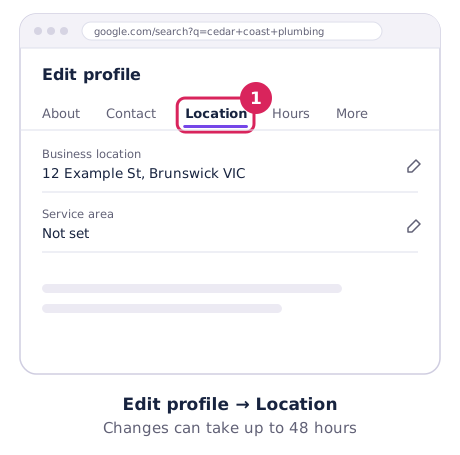
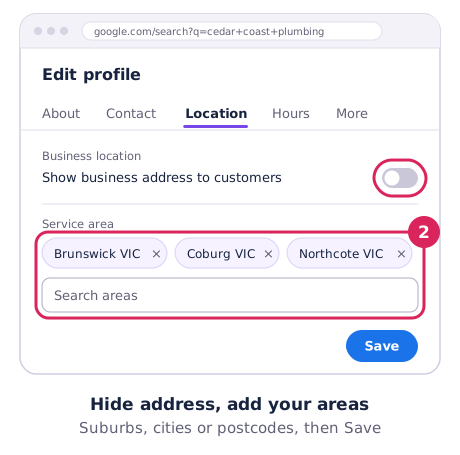
Google’s rules are on Manage your service area.
The rules
- Up to 20 service areas. You can’t set a radius.
- About 2 hours’ drive. Your whole area generally shouldn’t stretch further than that from your base, though Google says larger areas can suit some businesses.
- One profile for your whole area. Don’t create extra profiles for each suburb.
- No virtual offices or PO boxes to appear in other suburbs.
- Businesses selling age-restricted products (like alcohol) can’t be service-area only.
What service areas don’t do
Listing a suburb as a service area tells customers you work there. It doesn’t make you rank there. Google still ranks you partly on distance from your actual base, which is why rankings usually fade as you get further out. Here’s why.
To see how far your visibility really reaches, run a free Google Maps rank check across your area.
Getting stronger across your whole area
- Put the suburbs you serve on your website, with a page for your main service areas if they’re genuinely different.
- Ask customers in outer suburbs for reviews. They often mention the suburb naturally.
- Add photos of jobs across your area.
- Keep your category and services accurate. See the categories guide.