
How to reply
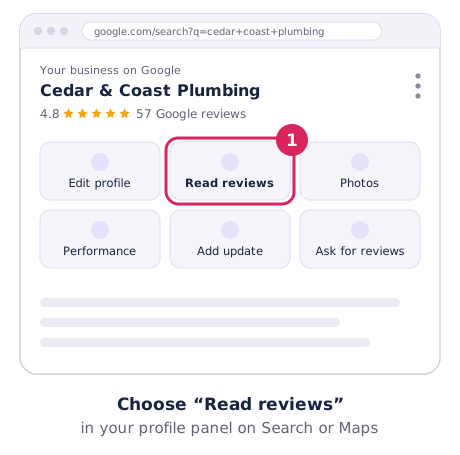
- Sign in and open your Business Profile on Google Search or Maps.
- Choose Read reviews, find the review and choose Reply.
- Write your reply and choose Reply to post it.
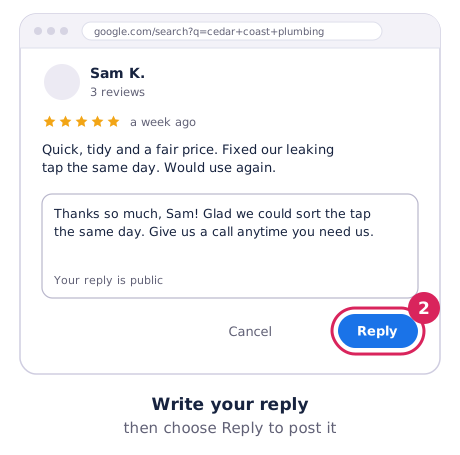
- Your reply is public and shows under the review as the business, not your personal name.
- The reviewer is notified when you reply, and may update their review.
- Google checks replies against its policies. It usually takes up to 10 minutes, but can take longer.
- You can edit or delete a reply at any time from the same screen.
Google’s steps are in Read and reply to reviews.
Seven rules for every reply
- Reply to every review, good and bad, ideally within a couple of days.
- Keep it short. Two to four sentences is plenty.
- Make it personal. Use their first name and mention the job or product.
- Never share private details. No invoice amounts, addresses or health information. Clinics and law firms shouldn’t even confirm the person was a client.
- Don’t argue in public. Say sorry where it’s fair, and offer to sort it out by phone or email.
- Don’t sell. No discounts or promotions. Google asks replies to be conversational, not promotional.
- Don’t copy and paste the same reply to every review. Use the templates below as a starting point.
Templates for 5-star and 4-star reviews
- “Thanks so much, [Name]! Glad the [job] came up well. We’ll pass your kind words on to [staff name].”
- “Thank you, [Name]. It was a pleasure working on your [job] in [suburb]. Give us a call anytime you need us again.”
- “Thanks for taking the time to leave a review, [Name]. Really pleased you’re happy with [product or result].”
- “Cheers, [Name]! Great to hear [staff name] looked after you. See you next time.”
- “Thanks, [Name]. We appreciate the 4 stars. If there’s anything we could have done better, we’d love to hear it: [phone or email].”
Templates for negative reviews
- “Hi [Name], I’m sorry the [job] didn’t go the way you expected. That’s not the standard we aim for. Please call me on [phone] so I can put it right.”
- “Thanks for letting us know, [Name]. You’re right that we [were late / missed that], and I apologise. We’ve [what you changed]. I’d like to make it up to you, so please get in touch at [email].”
- “Hi [Name], I’m sorry to read this. I’d like to understand what happened. Could you call me directly on [phone]? I’m [your name], the owner.”
- “Hi [Name], we’re sorry about the wait. [Day] was busier than planned, and we should have let you know sooner. We’ve changed how we confirm bookings so it doesn’t happen again.”
- “Hi [Name], thanks for the feedback on price. We quote every job upfront and are always happy to walk through what’s included. Please call if you’d like to go over it.”
Templates for mixed, star-only and suspicious reviews
- Mixed: “Thanks, [Name]. Glad you liked [good thing], and sorry [problem] let you down. We’re working on it, and we’d love another chance.”
- Stars only, positive: “Thanks for the 5 stars, [Name]! We really appreciate it.”
- Stars only, negative: “Hi [Name], sorry we didn’t get it right for you. We’d like to know what happened. Please contact us on [phone].”
- Returning customer: “Thanks for coming back again, [Name]! Always good to see you.”
- Can’t find them in your records: “Hi [Name], we can’t find a booking under this name and we’d like to look into this. Could you contact us on [phone] with a few details?”
- Looks fake: “We take all feedback seriously, but we have no record of working with you. If we’ve missed something, please call us on [phone].” Then report the review.
- Abusive: keep it short and calm (“We’re sorry you feel this way. Please contact us directly on [phone].”) and report the review.
- Review about the wrong business: “Hi [Name], it sounds like this may be meant for another business. We’re [business name] in [suburb]. If it was us, please get in touch.”
Should you use AI to write replies?
Want a quick first draft? Our free review reply generator gives you three options to edit. AI tools can help too, and Google has reportedly tested suggested replies in some dashboards. Always edit the draft so it sounds like you, mentions the real job, and never includes private details. Customers can spot generic replies.
Replies are only half of it
The best answer to a bad review is a steady stream of good ones. Ask every customer, using your direct review link, and see how many you need with our Google reviews calculator. More ideas are in how to get more Google reviews.