

What you need
- A Google account. If you use Gmail, YouTube or an Android phone, you already have one.
- Your name will show. Google reviews are public and can’t be anonymous. Your review appears with the name and photo on your Google profile.
The quickest way: use the business’s review link
If the business sent you a link or you’ve scanned a QR code on their counter or invoice, it opens the review box straight away. Pick your stars, write a few words and tap Post. That’s it.
On your phone (Google Maps app)
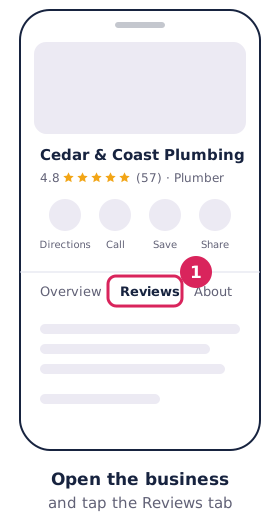
- Open the Google Maps app and search for the business.
- Tap the business to open its page, then tap the Reviews tab.
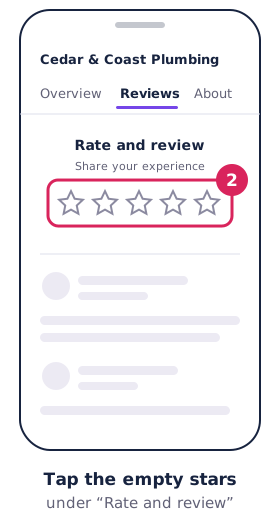
- Tap the empty stars and choose your rating.
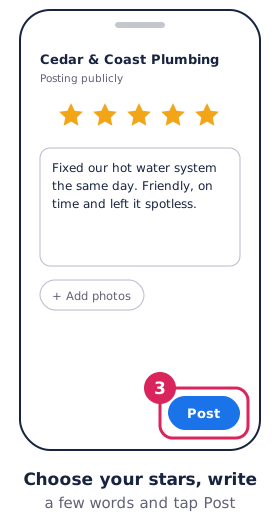
- Write about your experience. You can add photos and answer the optional questions too.
- Tap Post.
The buttons may sit in slightly different places on iPhone and Android, but the steps are the same.
On a computer
- Go to Google Maps and sign in.
- Search for the business and click it.
- Click Write a review.
- Choose your stars, write your review and add photos if you like.
- Click Post.
Google’s own steps are in Write, edit and delete reviews.
What makes a helpful review
- Say what you had done or bought, and roughly when.
- Mention the things other customers care about: on time, tidy, fair price, easy to deal with.
- Name the person who helped you if you remember.
- Keep it to your own experience. Google removes reviews that are off-topic, abusive or written for a reward.
How to edit or delete your review
- On a computer: open Google Maps, click the menu, then Your contributions → Reviews. Click More next to the review and choose Edit review or Delete review.
- In the app: tap Contribute → View your profile → See all reviews, then the three dots next to the review.
An edited review shows the date of your latest edit.
Own a business? Send this page to your customers
Customers who aren’t sure how to leave a review often just don’t. Send them your direct review link with a link to this page, and more of them will follow through.
Get your link, a QR code and a printable counter card from our free review link tool. For more ideas, see how to get more Google reviews.