
The short answer
- Businesses can’t delete reviews. Only Google can remove a review, and only if it breaks Google’s content policy.
- The reviewer can delete or edit their own review at any time.
- A negative review isn’t against the rules just because it’s unfair or you disagree with it. Genuine bad experiences usually stay up.
Reviews Google will remove
Google’s policy for Maps content lists what isn’t allowed. The categories that come up most for businesses:
- Fake engagement: reviews that aren’t based on a real experience, including reviews from competitors, current or former staff, or anyone with a conflict of interest.
- Off-topic: rants about politics, society or things unrelated to the business.
- Harassment and hate speech: personal attacks, threats or abuse aimed at you or your staff.
- Personal information: someone’s phone number, home address or private details.
- Profanity and obscenity used to offend.
- Advertising and spam: links, promotions or the same review posted again and again.
- Impersonation: someone pretending to be another person or business.
How to report a review
From your Business Profile (signed in as an owner or manager):
- Open your profile on Google Search or Maps and choose Read reviews.
- Find the review and choose Report.
- Pick the reason that fits best, then Send report.
From Google Maps (anyone can do this): open the business, go to Reviews, tap the three dots next to the review and choose Report review.
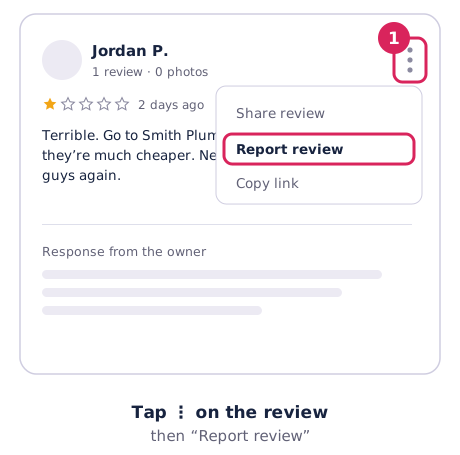
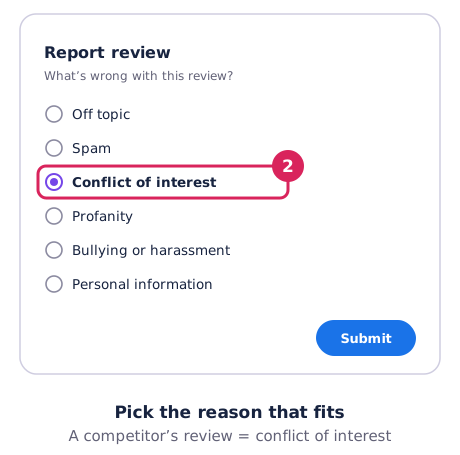
Pick the most accurate reason. A review from an ex-employee is a conflict of interest, not “spam”.
Track your report and appeal
Google’s Reviews Management Tool shows every review you’ve reported and its status: Decision pending, Report reviewed – no policy violation, or Escalated – check your email.
- Google says an assessment takes several days.
- If Google finds no violation, you get one appeal per review. Use it well: explain in a sentence or two which policy the review breaks, with any evidence (for example, that the reviewer is a former employee).
- The final decision comes by email.
Where Australian defamation law fits in
This is general information, not legal advice. If a review is seriously damaging, talk to a lawyer.
- Most companies can’t sue for defamation. Under the uniform defamation laws, a company can only sue if it has fewer than 10 employees (and isn’t part of a larger group) or is a not-for-profit. A person who is named or identifiable in a review can still sue.
- There’s a “serious harm” test. The review must have caused, or be likely to cause, serious harm to reputation. For a small company, that means serious financial loss.
- A concerns notice comes first. You must send a written concerns notice before starting proceedings.
- Rules for platforms are changing. Most states and territories have adopted 2024 reforms on how online platforms respond to complaints. Western Australia hadn’t adopted them at the time of writing.
Google also has a separate form for content that breaks local law. Legal removal is slow and costly, and a court fight can draw more attention to the review than it had before.
What not to do
- Don’t offer anything to have a review removed or changed. Google bans payments, discounts or freebies for removing a negative review.
- Don’t post fake positive reviews to bury it. It breaks Google’s rules and the Australian Consumer Law. See fake reviews and the ACCC.
- Don’t threaten the reviewer. It rarely works and often ends up in a screenshot.
- Be wary of removal services that guarantee results. Nobody outside Google can remove a review. Ask exactly how they’ll do it before you pay.
What works better for most bad reviews
- Reply calmly and publicly. Future customers read your reply as much as the review. Our guide to responding to reviews has templates.
- Offer to fix it offline. Customers whose problem gets sorted sometimes update their review. Google notifies them when you reply.
- Get more genuine reviews. One bad review matters much less among fifty good ones. Our Google reviews calculator shows how many you need to reach your target rating.