

Find your review link
Quickest way: use our free Google review link and QR code generator. Find your business and copy the link. No sign-in needed.
Or get it from Google yourself:
- Sign in to the Google account that manages your Business Profile.
- Search Google for your business name. Your profile management panel should appear at the top.
- Choose Ask for reviews (it may say Get more reviews).
- Copy the link Google shows you. It usually starts with
g.page/r/.
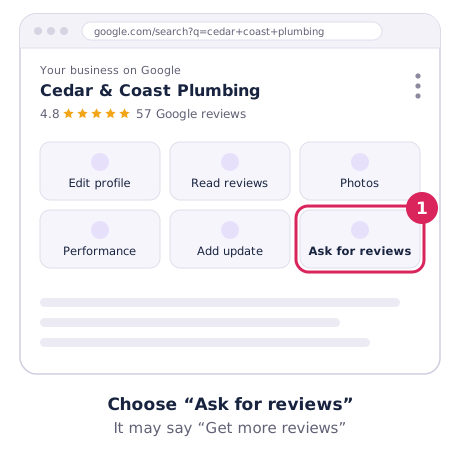
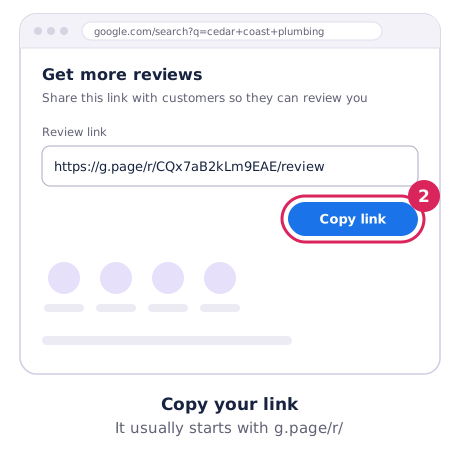
Google moves these buttons around from time to time. If you can’t see them, open your profile in the Google Maps app, where the same option appears under your profile tools.
Test it
Open the link in a private or incognito window, or on a phone that isn’t signed in as you. It should open your business with the review box ready to go.
Where to share it
- SMS straight after a finished job. It has the best response rate for most local businesses.
- Your email signature and invoices. A small “Happy with our work? Leave a review” line.
- A QR code on your counter, van, receipts or job cards. Our free tool makes the QR code, or make a printable review card with your own headline.
- Your website, as a button on your contact or thank-you page.
Keep it honest
Share the link with every customer, not just the happy ones, and don’t offer rewards for reviews. Our reviews guide covers what to say and what’s not allowed.
Want it done for you?
Our review growth service (from A$149) sets up your link and QR code, message scripts and reply templates.