
How to add photos and videos
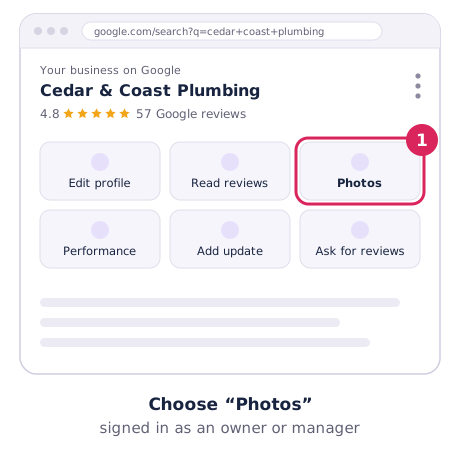
- Search your business name and suburb on Google Search or Maps while signed in as an owner or manager.
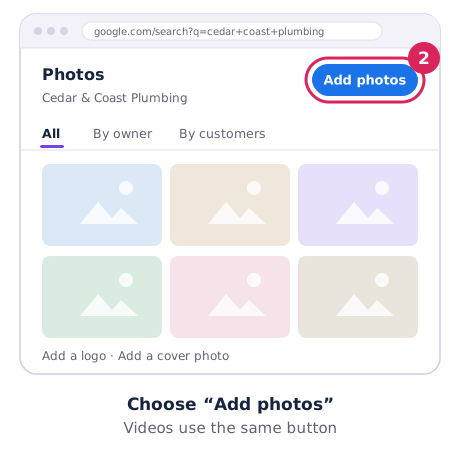
- Choose Photos → Add photos and select one or more files. Videos use the same button.
- For your logo and cover image, choose Add a logo or Add a cover photo (or Change).
New photos can take 24 to 48 hours to appear, and your profile must be verified before they show publicly. Google’s steps: Add or edit photos on your Business Profile.
Sizes and formats
| What Google accepts | |
|---|---|
| Photos | JPG or PNG, 10 KB to 5 MB. Recommended 720 × 720 px; minimum 250 × 250 px. |
| Videos | Up to 30 seconds, up to 75 MB, 720p or higher. |
What to add
Google suggests at least three of each type that fits your business:
- Outside: your shopfront or sign from the directions customers come, at different times of day.
- Inside: your shop, waiting area or workshop.
- Your work: finished jobs, before and afters, products.
- Your team: real people customers will meet.
- For service-area businesses: your branded vehicle, tools and jobs across your area.
Add a few new photos every month. A profile with last year’s photos looks like a business that’s slowed down.
What gets photos removed
Google’s photo and video policy asks for media you took yourself, at the location. It removes:
- Stock photos, screenshots, GIFs and collages.
- Heavily edited or filtered photos, or anything that doesn’t show reality. Small fixes like rotating or brightening are fine.
- Photos with added text, borders or graphics.
- Blurry, dark or shaky images.
Removals for low quality can’t be appealed, so it’s better to get it right first time.
Customer photos you don’t like
You can’t delete photos customers add, but you can report ones that break the rules (wrong place, personal information, spam or offensive content):
- Open your profile, choose Photos → View all photos and select the photo.
- Choose Report a problem, pick the reason and submit.
Google says it reviews reports within several business days. The best fix for unflattering customer photos is adding plenty of good ones of your own.