

The three types of post
- Update: news, a finished job, a new service. Add a photo or video, a description and a button with a link.
- Offer: needs a title and start and end dates, and gets a “View offer” button. You can add a coupon code, a link and terms.
- Event: needs a title and dates. Without times, Google shows it as lasting all day.
How to post
- Open your profile on Google Search or Maps and choose Posts → Add post.
- Choose Update, Offer or Event and fill in the details.
- Optional: turn on Schedule this post, or set it to repeat.
- Choose Post. Google reviews it and marks it Live, Pending or Not approved.
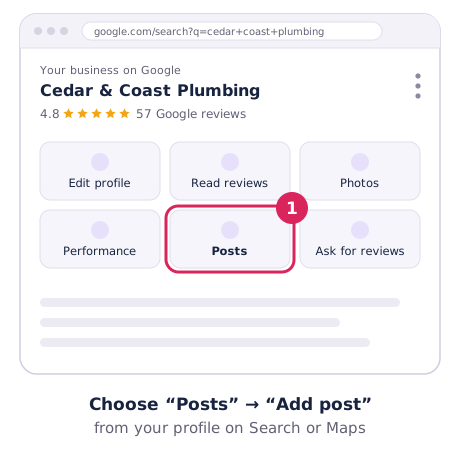
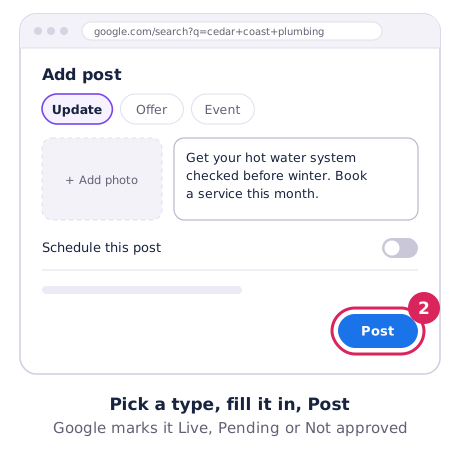
Google’s guide: Create posts on your Business Profile.
How long posts last
Google says posts older than 6 months are archived unless you set a date range. Offers and events end on their end date. In practice, one or two posts a month keeps your profile looking current.
What gets posts rejected
- Phone numbers, emails or social handles in the text. Google may reject them. Use the Call now button instead.
- Links to anything unsafe or misleading.
- Posts about regulated products (like alcohol or prescription medicines) that break Google’s content rules.
- Blurry, stock or heavily edited photos. Real photos of your work do better anyway.
Photos should be JPG or PNG, ideally at least 720 × 720 pixels.
12 post ideas for local businesses
- A before-and-after photo of a recent job.
- A new service or product.
- Public holiday hours, a week ahead.
- A seasonal tip (“Get your aircon serviced before summer”).
- Meet the team: a photo and one line about a staff member.
- A customer question you get all the time, answered.
- A limited-time offer with clear dates.
- An event, open day or workshop.
- A thank-you for a milestone, like 100 reviews.
- A new area you now service.
- Behind the scenes: your van, workshop or kitchen.
- A short video walk-through (up to 30 seconds).
Do posts help ranking?
Google doesn’t list posts as a ranking factor. Treat them as a way to help customers choose you once they find you, alongside reviews and photos. For what moves rankings, see how to rank higher on Google Maps.