

What attributes are
Attributes are extra facts about your business shown on Search and Maps. Google says, “If you add certain attributes, your business might show up in searches for places with those attributes.” Which ones you can choose depends on your category and country, and Google changes them over time.
Some you set yourself. Others Google fills in from what customers report after visiting.
How to edit them
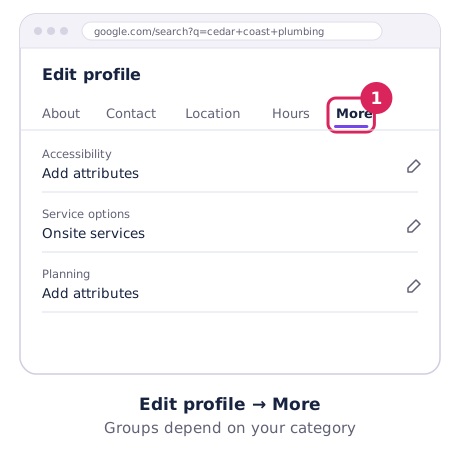
- Open your profile and choose Edit profile.
- Choose More and find the attribute groups for your business.
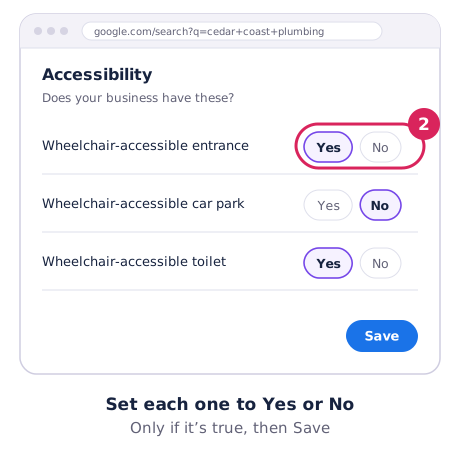
- Set each one to Yes or No, then Save.
Google reviews changes, usually within about 10 minutes but sometimes up to 30 days. Details: Edit your Business Profile attributes.
Attributes worth checking
- Accessibility: wheelchair-accessible entrance, toilet, seating and parking, lifts and hearing loops. Only tick what’s really there.
- Service options: such as delivery, takeaway or on-site services, depending on your category.
- Amenities: Wi-Fi, toilets, parking, outdoor seating.
- Payments: cards, contactless, cash only.
- Owner identity: options such as women-owned, Indigenous-owned, LGBTQ+ owned, disability-owned or small business. They’re optional and you can switch them off at any time.
Keep them accurate
A wrong attribute (like “wheelchair accessible” when it isn’t) leads to disappointed customers and bad reviews. Check your attributes whenever you change your premises or services, and look for changes Google has made from customer feedback in Edit profile.