

Which option do you need?
- Closed for a few days (holidays, a short break): set special hours.
- Closed for more than 7 days, for the off-season or indefinitely: mark it temporarily closed.
- Closed for good: mark it permanently closed.
- Moving: update your address. Don’t close the profile or start a new one.
- Selling the business: transfer ownership to the new owner.
- Stopping managing it yourself: remove the profile from your account.
Temporarily closed
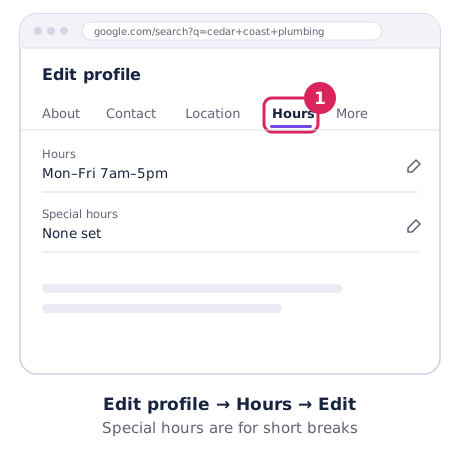
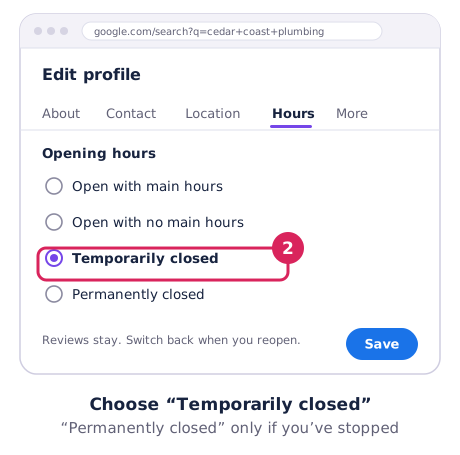
Go to Edit profile → Hours → Edit, choose Temporarily closed and save. Customers see that you’re closed, and your reviews stay.
Google says temporarily closed businesses can rank below open ones while they’re closed. Switch back to your normal hours as soon as you reopen. For short breaks, use special hours instead.
Permanently closed
Same place: Edit profile → Hours → Edit → Permanently closed. Google says the listing will slowly disappear from search results and then be removed. Only do this if the business has really stopped trading.
Moving to a new address
Update your address in Edit profile. Google will ask you to verify again at the new address.
- Don’t create a new profile for the new location. Google asks you not to.
- If you keep the same business name, Google says it transfers your reviews automatically.
- If you’ve already created a new profile by mistake, contact Google Business Profile support and ask them to move the reviews.
Selling or handing over the business
Add the new owner as an owner, then make them primary owner. The listing and its reviews stay with the business. Allow for Google’s 7-day wait on new owners. Step by step: owners, managers and transfers.
Removing the profile from your account
Open More → Business Profile settings → Remove Business Profile → Remove profile content and managers. Before you do, know what it does:
- Your posts, photos, videos and review replies are permanently deleted.
- Customer reviews and photos stay, and the business may still show on Maps and Search.
- It can’t be undone. To manage the business again, you’ll need to verify it again.
- Only the primary owner can do it.
So removing your profile doesn’t remove your bad reviews. It just stops you replying to them. Google’s details are in Remove a Business Profile.
Getting a listing off Google Maps
If a listing is a duplicate, never existed or isn’t eligible, anyone can ask Google to remove it. In Google Maps, open the listing, choose Suggest an edit → Place is closed or not here, pick the reason and submit.