

The quick way: import from Google
- Go to bing.com/forbusiness and sign in. Bing Places moved here from bingplaces.com in October 2025.
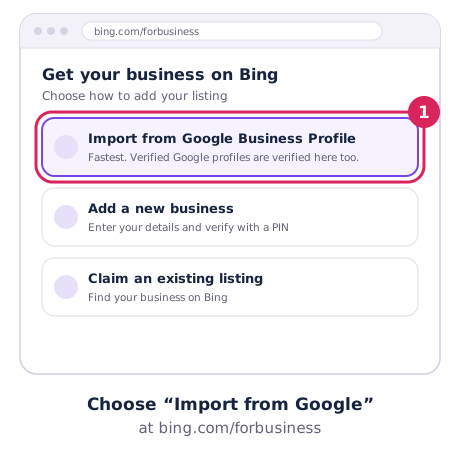
- Choose Import from your Google Business Profile and sign in to the Google account that manages your profile.
- Select the listings to import.
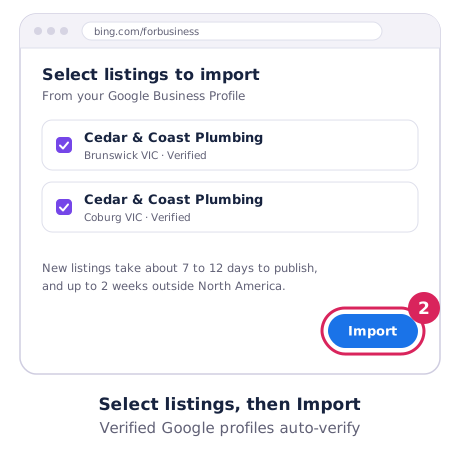
If your Google profile is already verified, Bing verifies the imported listing automatically. Bing says new listings take about 7 to 12 days to publish, and up to 2 weeks outside North America.
Keep it in sync
After importing, choose how often Bing copies changes from Google: weekly, fortnightly or monthly. Listings linked to Google are updated from Google, not edited in Bing, so make your changes on your Google profile first. Categories don’t always map exactly, so check yours after the first import.
Adding a listing by hand
No Google profile, or want to manage Bing separately? Create the listing in Bing Places and verify it with a PIN by phone, text, email or postcard. Bing decides which options you get:
- Phone only works if the listing already has your unedited business number.
- Email arrives within 15 minutes but needs an address on your own domain, not Gmail or Yahoo.
- Postcards can take 12 business days or more to reach Australia.
Editing a listing while a change is pending resets the publishing clock, so make your changes in one go.
Service-area businesses: hiding your address
Bing lets you hide your address only when you’ve added the service areas you cover (suburbs, regions or postcodes). You still enter a full address and category for verification. Bing says service areas only show for some categories.
Is Bing worth the effort?
Bing has far fewer Australian users than Google, but importing takes minutes and costs nothing. It’s also one more place that shows your correct phone number and hours. Do it once, set the sync, and move on. The same goes for Apple Maps.