
Apple Business Connect is now Apple Business
- Apple announced Apple Business in March 2026 and launched it on 14 April 2026. It replaces Business Connect.
- It’s free, and it’s available in Australia.
- If you already used Business Connect, your locations, photos and details moved across automatically. Sign in once at business.apple.com to finish the move.
Step 1: sign up and verify your business
- Go to business.apple.com and choose Sign up now. Use an Apple Account you’ll keep, ideally on your business email.
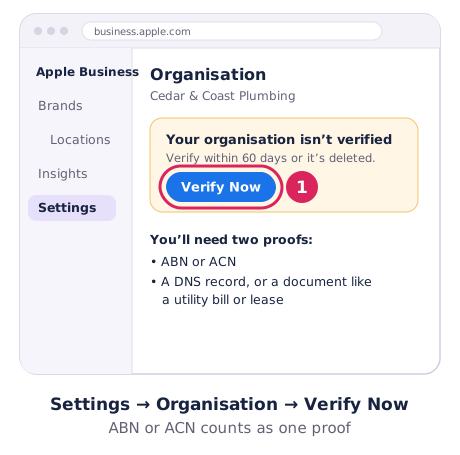
- Open Settings → Organisation → Verify Now. Apple asks for two proofs. For Australian businesses, your ABN or ACN counts as one. The other can be a DNS record on your website’s domain or an uploaded document such as a utility bill or lease.
- Apple reviews it in up to five working days.
You have 60 days to verify, or the new organisation is deleted, so don’t leave it half done.
Step 2: claim or add your location
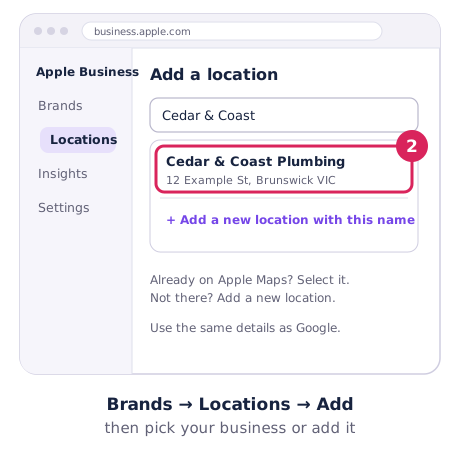
- Go to Brands → Locations → Add and type your business name.
- If Apple Maps already shows your business, select it. Apple may verify you with a phone call to the number on the listing, which reads out a 4-digit code.
- If it isn’t there, choose Add a new location with this name, then set the address and pin.
- Add your category, phone, website and hours, using the same details as your Google Business Profile.
If someone else has already claimed the listing, use Request Transfer and upload documents that show it’s your business.
Service-area businesses: Apple’s guides don’t say whether you can hide your address the way you can on Google. If you work from home, check what the listing will show before you publish it.
Step 3: the extras worth setting up
- Actions: buttons like Order, Reserve or Menu that link to your booking or ordering page. Apple approves them in up to 3 working days.
- Showcases: a short promotion card with a photo, a 38-character headline and a button. Handy for a seasonal offer or a new service. Submit it at least 3 days before you want it live.
- Insights: how many people searched for you, viewed your place card and tapped your buttons.
- Branded Mail: shows your logo next to emails you send to Apple Mail users. It needs your own domain, not a Gmail or Outlook address.
Apple’s Apple Business guide has the details for each.
Keep it matching your other listings
Use the same business name, phone number, website and hours on Apple, Google and Bing. When you change your hours or move, update all three on the same day. Our list of free Australian business directories covers the rest.