
Pick the right route
| Your problem | Where to go |
|---|---|
| Profile suspended or disabled | The appeals tool |
| A review you reported wasn’t removed | The Reviews Management Tool (one appeal per review) |
| Edits rejected, wrong info, duplicates, ownership, verification | The Contact us form |
| A competitor with a fake name, number or address | Google’s Business Redressal Complaint form |
| A general “how do I…?” question | The Business Profile Help Community |
Using the Contact us form
- Sign in to the Google account that owns or manages the profile.
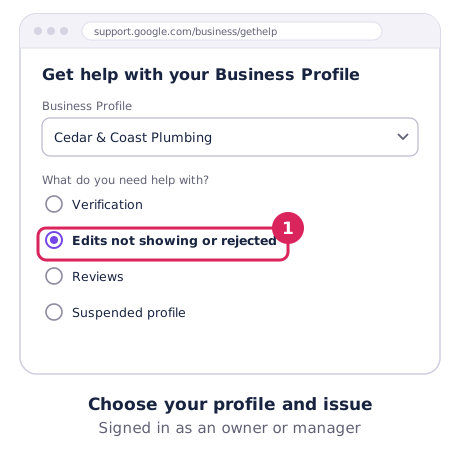
- Open support.google.com/business/gethelp, choose your profile and pick the issue that fits best.
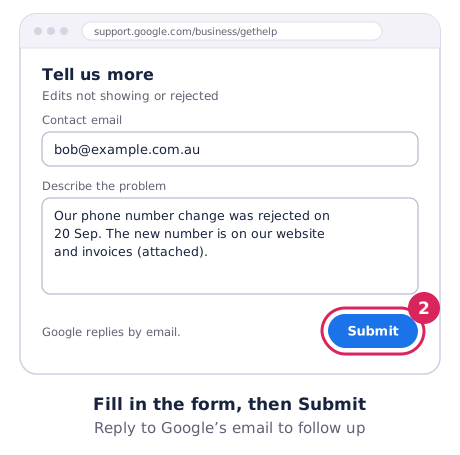
- Fill in the form and submit. Google replies by email.
- If the first reply doesn’t fix it, reply to that email rather than starting a new request. It keeps your case history together.
Suspended? Use the appeals tool
Suspensions and disabled profiles go through the appeals tool, not the contact form. You get 60 minutes to upload evidence once you open it, and Google says decisions take up to 5 business days. Don’t create a new profile while you wait. Our suspended profile guide has the full checklist.
How to write a request Google can act on
- One problem per request. Split “my hours are wrong and there’s a duplicate listing” into two.
- Give the exact profile. Include your business name, address or service area, and the Google Maps link.
- Say what’s wrong and what’s right. “Google shows our old phone number; the correct number is the one on our website and signage.” Then give both numbers.
- Attach proof. Signage photos, your ABN record, a utility bill or a screenshot of the problem.
- Stay polite and factual. The person reading it can escalate your case, or not.
The Help Community
The Help Community is a public forum answered by experienced volunteers, including Product Experts who can sometimes escalate stuck cases to Google. Don’t post private details like your phone number or documents there.
Beware of anyone offering “Google support” by phone
Google doesn’t cold-call businesses to “verify” or “update” your listing, and Business Profiles are free. If someone rings claiming to be from Google and asks for payment or your login, hang up.