

Where to find it
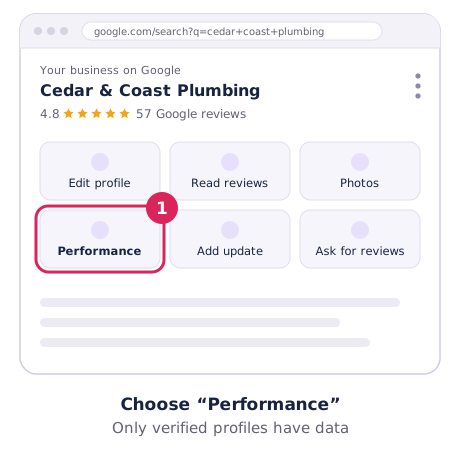
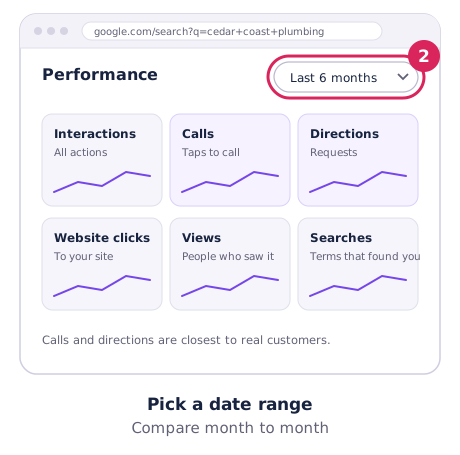
Open your profile on Google Search and choose Performance, then pick a date range. In the Google Maps app: Business → See more next to Performance. Only verified profiles have data. Google’s guide: Business Profile performance.
What each number counts
| Metric | What it counts |
|---|---|
| Views | People who saw your profile on Search or Maps, counted at most once per person per day. |
| Searches | The search terms that showed your profile, updated monthly. |
| Calls | Taps on your call button. |
| Directions | Requests for directions to your business. |
| Website clicks | Clicks through to your website. |
| Messages and bookings | Conversations and bookings made through your profile, where available. |
| Interactions | The total of the actions above. |
How to use it
- Compare month to month, not day to day. Seasonal businesses should compare with the same month last year.
- Read the Searches list. If people find you for services you don’t list, add them. If they don’t find you for your main service, check your categories.
- Watch calls and directions. They’re closest to real customers.
- Performance shows totals, not where you rank. For your position suburb by suburb, run a free rank check.
Export or connect to Google Analytics
- Export: in Business Profile Manager, select your profiles → Actions → Insights → choose dates → Download report.
- Google Analytics 4: you can link your profile under Admin → Product links → Google Business Profile links. GA4 shows the last 6 months, with multiple locations combined.
- Tag your website link with UTM parameters so profile visits show up separately in Analytics.